Maximum Likelihood Estimation
Unless the kwarg SkipOptim=true is passed to the DataModel constructor, it automatically tries to optimize the model parameters in an attempt to find the MLE. If no initial guess for the values parameters is provided, the constructor will try to infer the correct number of parameters and make a random initial guess. However, more control can be exerted over the optimization process by choosing an appropriate optimization method and corresponding options. These options may either be be passed to the DataModel constructor, or the optimization method InformationGeometry.minimize may be invoked explicitly after the DataModel was constructed with either unsuccessful optimization or skipping the automatic initial optimization altogether.
Most importantly, InformationGeometry.minimize is compatible with the Optimization.jl ecosystem of optimizer methods via the meth keyword. Best support is available for optimizers from the Optim.jl via a custom wrapper. Choosing meth=nothing also allows for using a Levenberg-Marquardt method from the LsqFit.jl optimizer, which is however only possible if data with fixed Gaussian uncertainties and no priors are used.
DM = DataModel(DataSet(1:4, [4,5,6.5,9], [0.5,0.45,0.6,1]), (x,p)->(p[1]+p[2])*x + exp(p[1]-p[2]), [1.3, 0.2]; SkipOptim=true)
plot(DM; Confnum=0)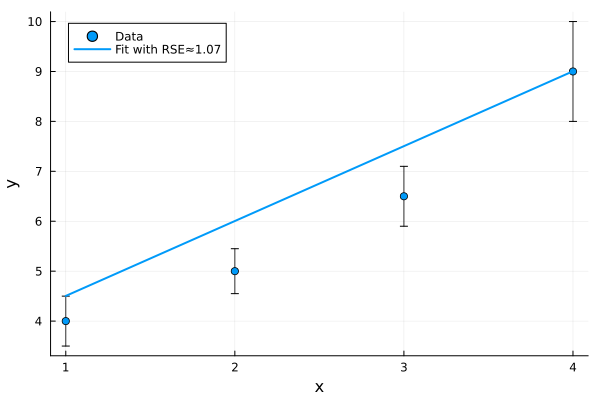
The optimization can then be performed with:
using Optim
mle = InformationGeometry.minimize(DM; meth=Optim.NewtonTrustRegion(), tol=1e-12, maxtime=60.0, Domain=HyperCube(zeros(2), 10ones(2)), verbose=true)
2-element Vector{Float64}:
1.151597136646767
0.33130205807936564The full solution object is returned if the keyword argument Full=true is additionally provided.
Alternatively, one might use optimizers from the Optimization.jl ecosystem e.g. via
using Optimization, OptimizationOptimisers
mle = InformationGeometry.minimize(DM, rand(2); meth=OptimizationOptimisers.AdamW())
or
using Optimization, OptimizationNLopt
mle = InformationGeometry.minimize(DM, rand(2); meth=OptimizationNLopt.GN_DIRECT())
Finally, the newly found optimum can be visually inspected with
plot(DM, mle)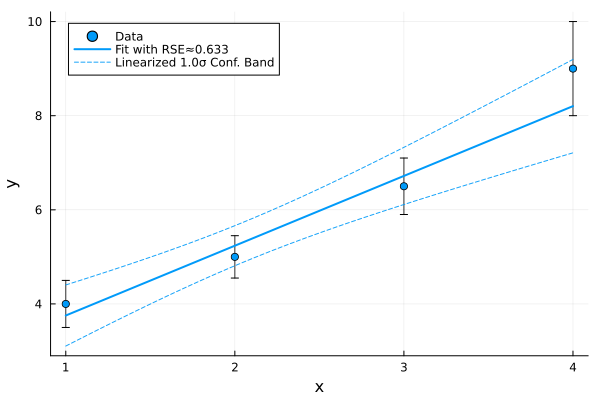
and added to the original unoptimized DataModel object via
DM = DataModel(Data(DM), Predictor(DM), mle; SkipOptim=true)Multistart Optimization
When a reasonable estimate for the initial parameter configuration is not available and optimizations starting from the approximate center of the parameter domain do not converge to a suitable optimum, a systematic search of the parameter space is needed. This can be achieved with the MultistartFit method, which will sample the parameter space $\mathcal{M}$ either according to a given probability distribution (e.g. uniform / normal) on $\mathcal{M}$ or by drawing the parameter values from a low-discrepancy sequence such as the Sobol sequence. Compared with uniformly drawn values, values drawn from low-discrepancy sequences achieve a more even and "equidistant" coverage, thereby slightly increasing the chances of discovering a larger number of distinct local optima overall.
Just like InformationGeometry.minimize, the MultistartFit method is also compatible with the Optimization.jl ecosystem of optimizer methods via the meth keyword.
using Optim
R = MultistartFit(DM; N=200, maxval=500, meth=LBFGS())
MultistartResults with 200/256 successful starts
Median number of iterations: 1
14/200 (7.0 %) convergent fits had same final objective value: -2.3178The most relevant keywords are:
MultistartDomain::HyperCubefor defining the domain from which the initial guesses are drawnN::Intfor choosing the number of startsmethfor choosing the optimizerresampling=falsedisables the drawing of new guesses when the objective function cannot be evaluated in some regions of the parameter spacemaxval::Real=1e5if noMultistartDomainis specified, a cube of size(-maxval, maxval)^(×n)is constructed
This returns a MultistartResults object, which saves some additional information such as the number of iterations taken per run, the initial guesses, etc. The parameter configuration is obtained with MLE(R). Alternatively, one could for example specify a distribution for the initials of the multistart optimization via
MultistartFit(DM, MvNormal([0,0], Diagonal(ones(2))); MultistartDomain=HyperCube([-1,-1],[3,4]), N=200, meth=Newton())The results of a multistart optimization can be visualized with a plot of the sorted final objective values, ideally showing prominent step-like features where the optimization reliably converged to the same local optima multiple times.
WaterfallPlot(R; BiLog=true)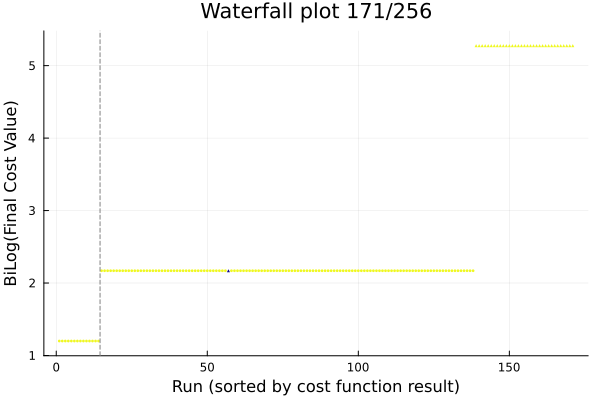
It can also be useful to investigate whether the parameter configurations within one "step" of the plot, where the final objective function value was the same, are actually "close" to each other, or whether there are distinct (or spread out) local optima, which nevertheless produce a fit of the same quality. This can be plotted via the ParameterPlot method, which can display the data either in a :dotplot, :boxplot or :violin plot.
using StatsPlots
ParameterPlot(R; st=:dotplot)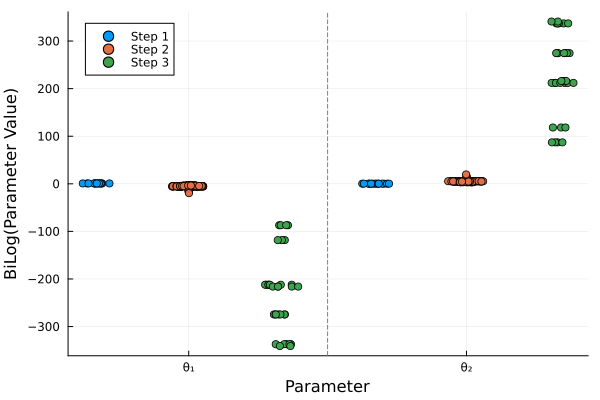
Seeing a spread in the ParameterPlot for the parameter configurations of the lowest "step" is already an indication that some parameter may be non-identifiable.
Exemplary parameter configurations from the n-th step in a Waterfall plot can be conviently retrieved via GetStepParameters(R, n) for plotting and other analyses. For instance, to compare the fit corresponding to the local optimum constituted by the second step:
plot(DM, GetStepParameters(R, 2))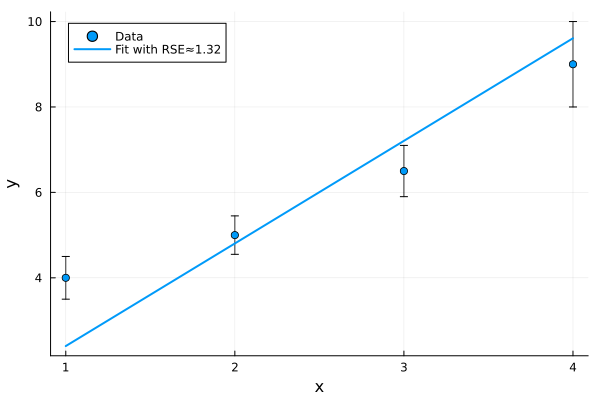
Robust Prefitting
While the above described methods InformationGeometry.minimize and MultistartFit allow for transparent and explicit control over individual optimization processes, the methods Prefit and Minimize are provided as convenient wrappers for combining these different functionalities recursively in powerful ways.
InformationGeometry.Minimize — Method
Minimize(DM::AbstractDataModel, startp::AbstractVector=MLE(DM); Full::Bool=false, Multistart::Int=0, kwargs...)Performs multistart optimization with MultistartFit or InformationGeometry.minimize depending on whether Multistart > 0 under one interface.
InformationGeometry.Prefit — Method
Prefit(DM::AbstractDataModel, mle::AbstractVector=MLE(DM); T::Type{<:Number}=eltype(mle), meth=DefaultStochasticOptimizer, maxiters::Int=10000, Safe::Bool=false, Domain=nothing, TryCatchOptimizer::Bool=true, tol=1e-8, PrintLossEvery=50, PlotEvery::Int=0, kwargs...)Performs pre-fit of DM at potentially lower precision specified by T (e.g. Float32) with stochastic optimizer and converts back to original precision in DM afterwards. Potential speed-up for models with neural network components. Kwarg Safe=true ensures that best configuration encountered during whole optimization is returned, instead of the final one of the last optimizer. Kwargs can also be forwarded to ParameterSavingCallback and can thus be used for early termination. For instance TerminationCriterion, TerminationLength, PrintLossEvery, Terminate and so on. By default, PrintLossEvery=50 results in the current value of the loss function being printed every 50 iterations.
The Prefit function can also be used to carry out multiple consecutive fits with shared or different settings, by supplying vectors for the arguments meth, maxiters and tol. For example: Prefit(DM; meth=[OptimizationOptimisers.OAdam(), OptimizationOptimJL.LBFGS()], maxiters=[3000, 1000], tol=[1e-3, 1e-10])
As optimizers, OptimizationOptimisers.OAdam(), OptimizationOptimisers.Rprop() or OptimizationOptimisers.AdamW() are strongly recommended for keyword meth! The optimizers provided by OptimizationOptimisers.jl only terminate on maxiters, not based on tol. Domain=nothing is passed by default, deactivating parameter boundaries.
Because Prefit relies on callbacks to extract parameter configurations during optimization for Safe=true, it requires the optimizers to be routed through the Optimization.jl backend. Therefore, the corresponding OptimizationOptimJL.jl (or similar) must be loaded first, see also ParameterSavingCallback.
The Minimize method merges the MultistartFit interface with the InformationGeometry.minimize interface, allowing the user to simply specify the number of multistarts via the Multistart::Int kwarg, where Minimize will only return the best parameter configuration observed during the multistart optimization and the default Multistart=0 falls back to using InformationGeometry.minimize.
Minimize(DM; MultistartDomain=HyperCube([-1,-1],[3,4]), Multistart=200, meth=Newton())The Prefit method allows for chaining multiple optimizations with different optimizers together in series and returning only the best observed parameter configuration. Moreover, it allows for sharing settings between the runs or choosing different settings per run by supplying the choices as a vector to the corresponding kwargs. For example:
using OptimizationOptimisers, OptimizationOptimJL
Prefit(DM; meth=[OAdam(), LBFGS(), Newton()], maxiters=[3000, 500, 50], tol=[0, 1e-8, 1e-12])
Almost all "higher order" wrapping methods for optimization (e.g. Prefit, IncrementalTimeSeriesFit, RobustFit, ParameterProfiles, etc.) accept the MinimizeFunc kwarg, which can be used to specify which concrete function should be used for the optimization. Since many of these methods share a similar interface, they can be combined and nested in complex ways. For instance, multistart optimization can be performed, where each of the individual runs in the multistart is carried out with a sequence of different optimizers with different settings via Prefit:
Minimize(DM; Multistart=100, MultistartDomain=HyperCube([-1,-1],[3,4]), MinimizeFunc=Prefit, meth=[OAdam(), LBFGS(), Newton()], maxiters=[3000, 500, 50], tol=[0, 1e-8, 1e-12])This results in 100 runs, where the random initial parameter configurations are first improved via robust stochastic optimizers to guide the optimization into roughly the correct region of parameter space and then refined with deterministic derivative-based optimizers. For complex models which easily become stiff for ill-chosen parameter configurations, this can significantly improve both convergence and overall computational effort of the multistart. This is because the deterministic optimisers get stuck far less often in parameter regions where the model is stiff and derivatives are more both more time-intensive to compute and less reliable. Therefore, less computational time is wasted on runs which eventually do not converge to a local optimum.
By default, the Prefit method uses Domain=nothing to turn of boundaries for parameters in order to improve compatibility with different optimization methods, which might not support specification of boundaries. However, if the chosen optimization method(s) support(s) boundaries, this can be turned back by manually supplying the kwarg Domain.
InformationGeometry.minimize — Function
minimize(F::Function, start::AbstractVector{<:Number}; tol::Real=1e-10, meth=DefaultZerothOrderOptimizer, Full::Bool=false, maxtime::Real=600, kwargs...) -> Vector
minimize(F, dF, start::AbstractVector{<:Number}; tol::Real=1e-10, meth=DefaultFirstOrderOptimizer, Full::Bool=false, maxtime::Real=600, kwargs...) -> Vector
minimize(F, dF, ddF, start::AbstractVector{<:Number}; tol::Real=1e-10, meth=DefaultSecondOrderOptimizer, Full::Bool=false, maxtime::Real=600, kwargs...) -> Vector
Minimizes the scalar input function using the given start using any algorithms from the Optimation.jl ecosystem specified via the keyword meth. Full=true returns the full solution object instead of only the minimizing result. Optionally, the search domain can be bounded by passing a suitable HyperCube object as the third argument (ignoring derivatives).
InformationGeometry.MultistartFit — Function
MultistartFit(DM::AbstractDataModel; maxval::Real=1e3, MultistartDomain::HyperCube=FullDomain(pdim(DM), maxval), kwargs...)Performs Multistart optimization with N starts and timeout of fits after timeout seconds. If resampling=true, if likelihood non-finite new initial starts are redrawn until N suitable initials are found. If Robust=true, performs optimization wrt. p-norm according to given kwarg p. For Full=false, only the final MLE is returned, otherwise a MultistartResults object is returned, which can be further analyzed and plotted. The keyword TransformSample can be used to specify a function which is applied to the sample, allowing e.g. for sampling only a subset of the parameters and then adding on components which should stay at fixed initial values for the multistart.
Any further keyword arguments are passed through to the optimization procedure InformationGeometry.minimize such as tolerances, optimization methods, domain constraints, etc.
InformationGeometry.LocalMultistartFit — Function
LocalMultistartFit(DM::AbstractDataModel, Confnum::Real=2; kwargs...)
LocalMultistartFit(DM::AbstractDataModel, mle::AbstractVector{<:Number}, Confnum::Real=2; kwargs...)
Performs a multistart search locally around a given MLE in a cube constructed from the Fisher information.
InformationGeometry.WaterfallPlot — Function
WaterfallPlot(R::MultistartResults; BiLog::Bool=true, MaxValue::Real=3000, StepTol::Real=1e-3, kwargs...)Shows Waterfall plot for the given results of MultistartFit. StepTol is used to decide which difference of two neighbouring values in the Waterfall plot constitutes a step. StepTol=0 deactivates step marks. MaxValue is used to set threshold for ignoring points whose cost function after optimization is too large compared with best optimum. BiLog=false disables logarithmic scale for cost function. A custom transformation can be specified via keyword Trafo::Function.
InformationGeometry.ParameterPlot — Method
ParameterPlot(R::MultistartResults; st=:dotplot, BiLog::Bool=true, Nsteps::Int=5, StepTol::Real=1e-3, MaxValue=3000)Plots the parameter values of the MultistartResults separated by step to show whether the different optima are localized or not. st can be either :dotplot, :boxplot or :violin.
InformationGeometry.IncrementalTimeSeriesFit — Method
IncrementalTimeSeriesFit(DM::AbstractDataModel, initial::AbstractVector{<:Number}=MLE(DM); steps::Int=3, Method::Function=InformationGeometry.minimize, Safe::Bool=true, kwargs...) -> VectorFits DataModel incrementally by splitting up the times series into chunks, e.g. fitting only the first quarter of data points, then half and so on. This can yield much better fitting results from random starting points, particularly for autocorrelated time series data. For example when the time series data oscillates in such a way that the optimization often gets stuck in a local optimum where the model fits a mostly straight line through the data, not correctly recognizing the oscillations. Safe=true returns the parameter configuration corresponding to the best intermediate result between steps that was seen, otherwise the output after the final step is returned.
InformationGeometry.RobustFit — Function
RobustFit(DM::AbstractDataModel, start::AbstractVector{<:Number}; tol::Real=1e-10, p::Real=1, kwargs...)Uses p-Norm to judge distance on Dataspace as specified by the keyword.